

By Ivan Geraghty
What changed when media moved to IP?
An SDI or ASI handoff was a coaxial cable carrying one signal in one direction. Nothing else could travel along it. An IP handoff is a shared network link, and three risks come with it.
The first is misconfiguration. Illustrative example: an extra zero is typed into an encoder’s bitrate setting, and a contribution feed agreed at 15 Mbit/s arrives at 150 Mbit/s. On a coaxial link the extra bitrate goes nowhere. On a shared IP network it competes with every other service, adding jitter or interrupting other streams.
The second is deliberate attack. Every external connection, whether to a partner, a provider, or the internet, is a potential route in, and pivoting lets an attacker move from one connected network to the next.
The third is timing. Uncompressed ST 2110 production depends on PTP, and a small disruption to the network that carries it can cause a major outage.
Enterprise IT firewalls remain essential for office and management traffic, but they are built for bursty, connection-based traffic. Application-aware inspection can buffer packets, which adds jitter to a live stream, and SMPTE RP 2129 notes that IT firewalls able to handle media bandwidths are not commercially viable. Media needs its own boundary alongside them.
What does SMPTE RP 2129 recommend?
SMPTE RP 2129 places a trust boundary at the demarcation point between two organisations. The boundary has a trusted interface facing the internal network and an untrusted interface facing the other party, in a different address space. It drops every packet that an explicit rule does not allow, in both directions.
The Recommended Practice expects each organisation to run its own boundary, so that security responsibility stays internal. It also recommends NAT to remove overlapping address ranges, per-flow rate control on ingress, and source-specific multicast. It covers three situations: RTP flows on managed networks, the same flows with forward error correction, and retransmission-based protocols over unmanaged networks, where authentication and encryption apply.
How does the X Platform implement a trust boundary?
All IP data traffic entering or leaving an X Platform chassis passes through an FPGA-driven media firewall. The media firewall blocks all traffic by default, and the only flows that pass are those an operator has configured. Because streams are firewalled at both the input stage and the output stage, a flow mapped between two networks crosses two firewalls.
The media interfaces give no access to the module’s processor or operating system. Management uses a dedicated control port with its own firewall, on a separate network.
The same hardware applies the functions RP 2129 describes: per-flow NAT for multicast and unicast, a traffic policer on each input, QoS marking on each output, ST 2022-7 dual-path protection, and per-flow monitoring with alarms. The trust boundary is part of the chassis that already carries the media, so no separate device is needed.
Common misconceptions about media trust boundaries
Myth: an enterprise IT firewall is enough to protect live media traffic.
Fact: SMPTE RP 2129 notes that IT firewalls able to handle media bandwidths are not commercially viable. Application-aware inspection can buffer packets, which adds jitter a live stream cannot absorb — media needs its own boundary alongside the IT firewall, not instead of it.
Myth: a software firewall on the same server as media processing gives the same protection as a dedicated trust boundary.
Fact: the Appear X Platform builds the firewall into the FPGA of its X5, X10, and X20 chassis. The media interfaces give no access to the module’s processor or operating system, so there is no shared software surface to compromise.
Myth: meeting SMPTE RP 2129 is a one-off certification.
Fact: RP 2129 is a Recommended Practice, not a certification. It places responsibility for security testing — including penetration testing of the trusted and untrusted interfaces — on each organisation that deploys a boundary.
Workflow one: handing channels to a distribution partner
A broadcaster delivers channels to a distribution partner over a private link. The risk is exposure: without a boundary, the link joins two networks.
The numbers in brackets refer to the markers in Figure 1. An X20 at the broadcaster’s edge (1) passes only the agreed RTP flows. On the link (2), NAT maps the internal addresses to a small interconnect range that both parties agree, so neither has to renumber, and egress traffic carries the agreed QoS marking. The partner runs its own boundary on its side of the link (3). Unexpected traffic arriving from the partner’s side (4) is dropped in the FPGA before it reaches the facility, and monitoring at the handoff records what was delivered.
Where the same channels also go to affiliates from the cloud, the chassis sends them to Appear VX (5) over SRT with AES encryption. VX manages its own firewall rules, opening only the ports that running workflows need and closing them when a workflow stops. Management traffic (6) stays on a dedicated control port, on the management network behind the enterprise firewall, and never shares the media ports.
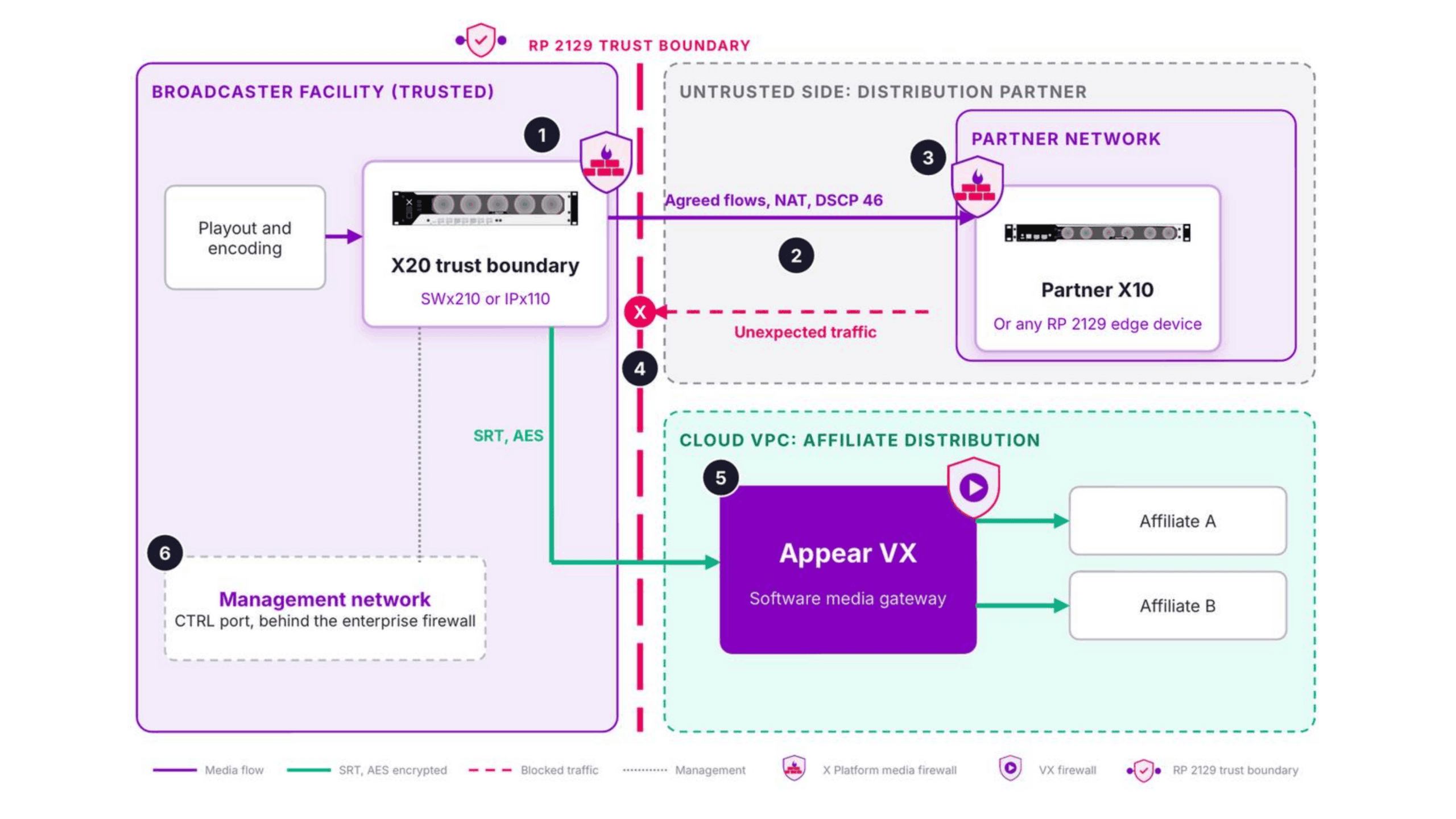
Figure 1: A broadcaster’s trust boundary at the handoff to a distribution partner, with optional cloud distribution through Appear VX. Click to enlarge.
Workflow two: carrying channels for several broadcasters
A service provider carries channels between broadcasters, across sites in different locations. The risk is that one customer affects another.
A trust boundary sits at each site where customers connect (1). Two broadcasters often use the same private address range internally (2), and per-flow NAT lets both connect without changing their address plans. The traffic policer drops bitrate above the agreed level at ingress (3), so the misconfigured feed in the example above cannot flood the provider’s core. Between sites (4), ST 2022-7 sends each flow over two separate routes. Per-flow monitoring at each handoff (5) gives the provider a record of what every customer sent and received. The provider’s operations centre reaches both sites over a separate management network (6), behind the enterprise firewall.
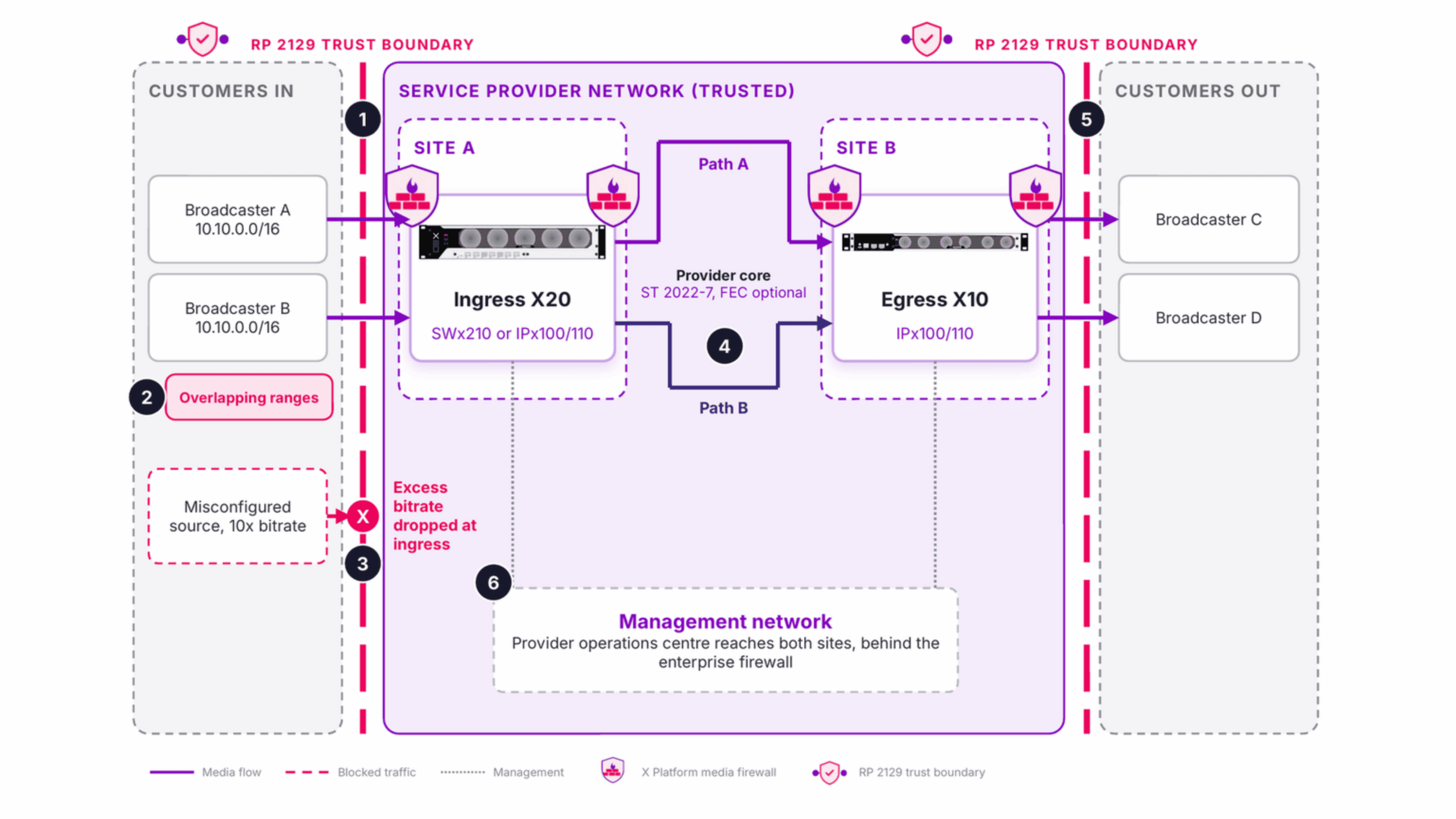
Figure 2: A service provider with a trust boundary at each site, isolating customers from one another and from the provider core. Click to enlarge.
Workflow three: contribution over the public internet
Venues send feeds to a broadcast facility across the public internet, which neither end controls.
An X5 at each venue encodes the feed and sends it as SRT with AES-128 or AES-256 encryption (1). At the facility, an X10 or X20 acts as the SRT gateway and accepts only known callers (2), using Stream ID and IP access filters. The media firewall checks flows at the gateway’s input and again at its output (3), so only the configured streams enter the facility network.
The same feeds can go to Appear VX in the cloud for production or onward distribution. VX discovers the SRT outputs of connected X Platform units automatically (4), opens only the ports that running workflows need (5), and secures its interfaces with certificates and single sign-on (6).
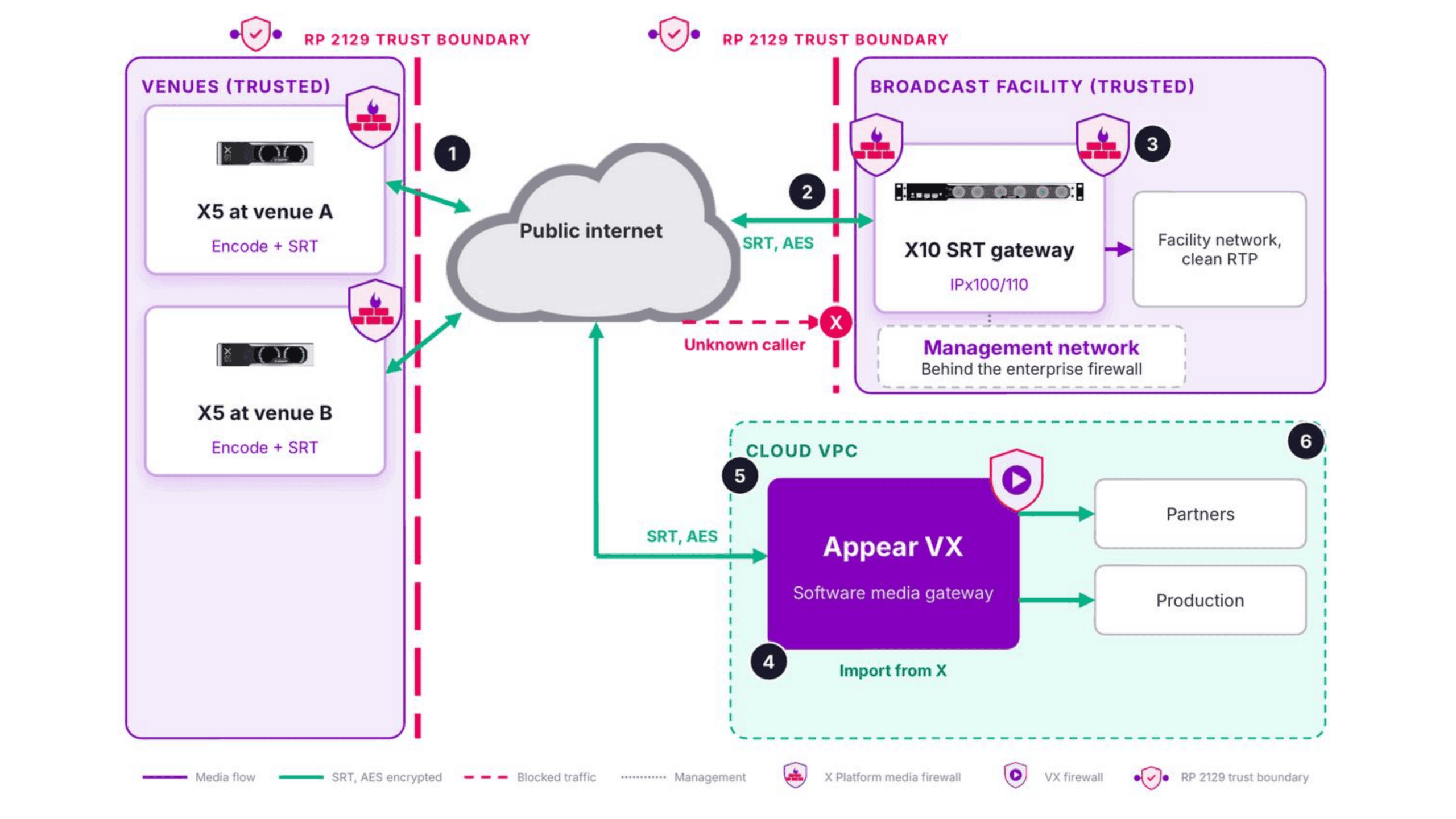
Figure 3: Venue contribution over the public internet into a facility SRT gateway, and into Appear VX in the cloud. Click to enlarge.
The three workflows at a glance
| Workflow | Main risk | Where the boundary sits | What protects it |
|---|---|---|---|
| Handing channels to a partner | Two networks joined by one link | The broadcaster’s edge, with the partner’s own boundary opposite | Default deny, NAT, QoS marking, monitoring at the handoff |
| Carrying channels for several broadcasters | One customer affecting another | Each provider site where customers connect | Per-flow NAT, traffic policing, ST 2022-7 across separate routes |
| Contribution over the public internet | An untrusted network between venue and facility | The venue edge and the facility’s SRT gateway | AES-encrypted SRT, Stream ID and IP access filters, firewall at input and output |
Where else does the same approach apply?
The same boundary applies wherever linear media crosses between networks:
- OTT headends. RP 2129 places the boundary where linear feeds arrive for transcoding. Where a separate provider handles packaging and delivery, Appear applies the same principle at egress.
- Remote production. Venue links enter a facility through a boundary that keeps untrusted traffic away from the ST 2110 network and its PTP timing.
- ST 2110 facility interconnect. Two fabrics share selected flows through domain NAT, without merging their networks or address plans.
What a trust boundary does not do
A media trust boundary protects media flows at the network edge. It does not replace an enterprise firewall, which continues to protect IT and management traffic, and the two should be deployed together.
SMPTE RP 2129 is a Recommended Practice, not a certification. It places responsibility for security testing on each organisation that deploys a boundary, including penetration testing of the trusted and untrusted interfaces. The workflows above are reference designs: the right modules, interfaces, and licensed options, such as ST 2022-7 and forward error correction, depend on the capacity and protocols of each deployment.
Rules of thumb for deploying a media trust boundary
- Run a trust boundary per organisation, not per network — security responsibility stays internal.
- Firewall every flow at both the input stage and the output stage, never just one.
- Keep management traffic on a separate, dedicated control port — never share it with media ports.
- Pair a media firewall with an enterprise IT firewall; one does not replace the other.
- Treat each deployment as a reference design — match modules, interfaces, and licensed options, such as ST 2022-7, to the capacity and protocols actually in use.
Get the brief
One REMI workflow, every event. A solution brief for broadcast and media teams building remote production at scale.
Inside the brief:
- Low-latency contribution across managed and unmanaged networks
- Building resilience into remote production workflows
- Reducing on-site infrastructure per event
Complete the form to download.
How to deliver low-latency, resilient contribution across managed and unmanaged networks—while reducing on-site infrastructure.
Download the brief